Python教程-Python 协程

在本教程中,我们将学习 Python 中的协程。我们将详细讨论协程、子程序、协程的执行以及在 Python 中关闭协程。
在我们开始学习协程之前,我们必须对 Python 中的子程序有基本的了解。因此,我们将从 Python 子程序开始本教程。
Python 子程序
众所周知,在 Python 中有函数,我们可能知道或不知道这些 Python 函数也被称为过程、子过程或子程序。
通常,Python 中的函数是一系列指令的打包序列,它们作为一个单元来执行代码中的某个特定任务。当我们将复杂函数的逻辑划分为几个自包含的步骤,并且这些步骤像一个独立的函数(嵌套函数等)一样工作时,主函数中的这些辅助或嵌套函数被称为 Python 中的子程序。
在 Python 中,子程序是由主函数调用的,主函数在使用函数的同时负责协调它们。Python 中的所有子程序都只有一个入口点,即主函数的开始。
主函数
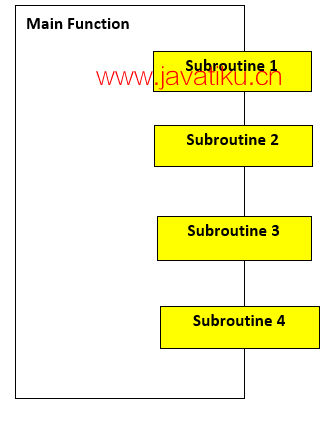
从上面给出的图中,我们可以轻松得出结论,主函数在使用子程序时是必需的,主函数也是子程序在 Python 中的唯一入口点。
什么是协程?
现在,在这一部分,我们将讨论协程,它们基本上是子程序的一种概括。
协程通常用于进程的协同多任务,即自愿放弃(yield)一段时间(周期性地)控制权。当空闲时,协程也可用于同时运行多个应用程序。
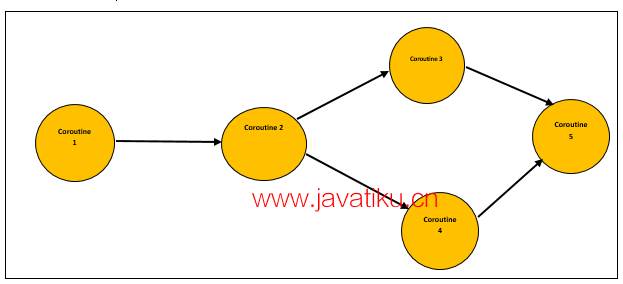
协程不同于线程,因为在协程中,是程序员和编程语言决定何时切换协程,而在线程的情况下,操作系统安排线程之间的切换。
协程与子例程的区别
| 协程 | 子例程 |
|---|---|
| 与子例程不同,协程具有多个入口点。 | 子例程只有一个入口点,即主函数。 |
| 我们只能从Python子例程的单一点挂起和恢复执行,只能从起始点恢复执行。 | 我们可以从Python协程的函数中的多个点挂起和恢复执行,也可以从上次挂起的地方恢复执行。 |
| 与子例程不同,Python协程没有主函数来特别指导和协调它们的执行。 | 在Python子例程中,主函数协调多个子例程之间的执行并控制它们的执行。 |
| 协程是协作的,因为它们在执行时一起形成了一个管道结构。 | 子例程形成线性执行结构。 |
| 在协程中,我们有一个协程来显示输入数据的结果。 | 对于子例程,输入数据中的处理结果由主函数显示。 |
Python中的协程
协程与Python中的生成器非常相似,但协程在yield(放弃)语句和一些附加方法方面有一些修改。Python协程还能够消耗输入数据,而生成器只能在函数中生成数据。
在Python版本高于2.5的情况下,我们可以观察到协程的yield语句发生了细微变化,经过这个变化后,yield语句可以用作表达式。
示例: 将yield分配到右侧,即LineOfCode = (yield)
在程序中发送给协程的任何值都将被协程捕获,并仅通过yield表达式返回。我们只能通过send()函数向协程发送值。
考虑下面的程序中的协程,它将仅打印具有“Officer”前缀的名称,并且我们将使用send()函数将名称发送到协程。
示例:
# Default function to search prefix
def print_name(prfx):
    print("Coroutine object searching for the prefix: {}".format(prfx)) # Searching for prefix
    while True:
        GivenName = (yield)
        if prfx in GivenName: # If required prefix match
            print(GivenName) # Print  given name
CorouteObject = print_name("Officer") # Taking prefix = Officer for coroutine object
# Taking names as input from user
Name1 = input("Enter first name: ")
Name2 = input("Enter second name: ")
Name3 = input("Enter third name: ")
CorouteObject.__next__() # using _next_() method to call coroutine
# sending input data to coroutine with send() method
CorouteObject.send(Name1)
CorouteObject.send(Name2)
CorouteObject.send(Name3)
输出:
Enter first name: Alex
Enter second name: Officer Steve Rogers
Enter third name: Officer Natasha Widow
Coroutine object searching for the prefix: Officer
Officer Steve Rogers
Officer Natasha Widow
解释 -
正如我们在上面的程序中所看到的,我们从用户那里输入了三个名称作为输入数据,我们使用send()方法将用户输入数据发送到函数中定义的协程。我们在协程中使用“Officer”关键字来搜索具有“Officer”前缀的名称,并且协程只会打印匹配的名称,正如我们在输出中看到的。
协程的执行
在Python中,协程的执行方式与生成器非常相似。当我们在程序中调用协程时,不会发生任何事情;它只会在以下两种响应中运行:send()和next()函数。
在上面的示例中,我们可以清楚地看到,协程仅在程序中调用_next_()方法后才开始执行。协程被调用后,执行会前进到yield的第一个表达式。
之后,协程的执行暂停,等待要发送给协程对象的值。在第一个值发送给协程对象后,它会检查所需的前缀是否存在,如果存在,对象将打印带前缀的名称。在打印名称后,它将通过一个连续的循环,直到再次遇到name = (yield)表达式。
关闭协程
要关闭协程,我们必须在程序中使用close()函数。当我们关闭协程时,它将生成一个异常,即GeneratorExit异常,我们可以像处理异常一样捕获它。
示例 -
# Default function to search prefix
def print_name(prfx):
    print("Coroutine object searching for the prefix: {}".format(prfx)) # Searching for prefix
    # Using excption handling by try and except
    try:
        while True:
            GivenName = (yield)
            if prfx in GivenName: # If required prefix match
                print(GivenName) # Print given name
    except GeneratorExit: # Handling GeneratorExit exception
            print("Now we have closed the coroutine!!")
CorouteObject = print_name("Officer") # Taking preifx = Officer for coroutine object
CorouteObject.__next__() # using _next_() method
# sending input data to coroutine with send() method
CorouteObject.send("Alexa")
CorouteObject.send("Officer Tony Stark")
CorouteObject.send("Officer Steve Rogers")
# closing the coroutine
CorouteObject.close()
输出:
Coroutine object searching for the prefix: Officer
Officer Tony Stark
Officer Steve Rogers
Now we have closed the coroutine!!我们必须记住,如果在关闭协程后尝试发送值到协程对象,程序将在输出中引发StopIteration异常。
通过链接协程创建管道结构
我们可以使用协程创建管道结构。将多个协程链接在一起后,我们可以使用push()方法通过创建的管道结构传送给定数据。要在程序中使用协程创建管道结构,我们必须注意以下几点:
- 我们必须提供一个初始源,即生产者,它将生成完整的管道结构。通常,生产者本身不是协程,而只是一个简单的方法。
- 我们必须在管道的末端创建一个汇,汇将充当管道的终点。汇是协程管道中的点,可以收集所有输入数据并显示它。
请了解以下带有管道结构的协程程序。
示例:
# Defining producer for the pipeline
def producer(GivenSentence, NextCoroutine):
    tokens = GivenSentence.split(" ") # splitting sentence
    for token in tokens: # iterating over tokens
        NextCoroutine.send(token)
    NextCoroutine.close() # closing coroutine
# Defining pattern filter for the pipeline structure
def pattern_filter(SearchPattern = "ing", NextCoroutine = None):
    print("In the input sentence, we are searching for words that end with{}".format(SearchPattern)) # Searching for pattern
    try:
        while True:
            token = (yield) # yielding tokens
            if SearchPattern in token:
                NextCoroutine.send(token) # Sending tokens
    except GeneratorExit: # Exception handling for GeneratorExit exception
        print("We are done with filtering the given input sentence!!")
# Defining sink for the pipeline
def print_token():
    print("I'm sink in the pipeline and I am used to print the tokens given.")
    try:
        while True:
            token = (yield) # yielding tokens
            print(token) # printing the tokens from sink
    except GeneratorExit:
        print("Now we are done with printing!")
# Taking sink variable
PrintToken = print_token()
PrintToken.__next__() # calling sink
# Taking Pattern filter variable
PatternFilter = pattern_filter(NextCoroutine = PrintToken)
PatternFilter.__next__() # calling pattern filter
# Taking a sentence for the producer in the pipeline
GivenSentence = "Steve rogers is running very fast to chase down a train moving with high speed"
producer(GivenSentence, PatternFilter) # calling producer
输出:
I'm sink in the pipeline, and I am used to printing the tokens given.
In the input sentence, we are searching for words that end with ing
running
moving
We are done with filtering the given input sentence!!
解释 -
这是我们如何使用多个协程创建管道,并过滤输入数据的方式。过滤或结果数据将在管道的汇点显示,正如我们在上面的输出中看到的。


