Spring教程-Spring 和 Struts 2 集成

Spring 和 Struts 2 集成
Spring 框架提供了一种简单的方法来管理依赖关系,它可以轻松地与 Struts 2 框架集成。
ContextLoaderListener 类用于在 spring 应用程序与 Struts 2 之间进行通信。它必须在 web.xml 文件中指定。
你需要按照以下步骤进行操作:
- 创建 Struts 2 应用程序并添加 Spring jar 文件。
- 在 web.xml 文件中,定义 ContextLoaderListener 类。
- 在 struts.xml 文件中,为 action 类定义 bean 名称。
- 在 applicationContext.xml 文件中,创建 bean。其类名应为 action 类名,例如 cn.javatiku.Login,并且 ID 应与 struts.xml 文件中的 action 类匹配(例如 login)。
- 在 action 类 中,定义额外的属性,例如 message。
Spring 和 Struts 2 集成示例
为了创建一个简单的 Spring 和 Struts 2 应用程序,你需要创建以下文件:
- index.jsp
- web.xml
- struts.xml
- applicationContext.xml
- Login.java
- welcome.jsp
- error.jsp
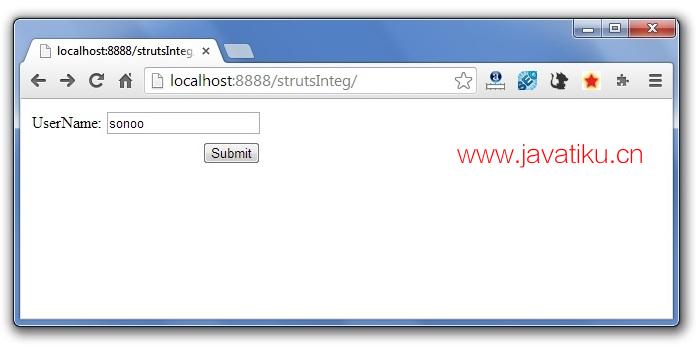
1) index.jsp
此页面从用户获取名称。
<%@ taglib uri="/struts-tags" prefix="s"%>

<s:form action="login">
<s:textfield name="userName" label="UserName"></s:textfield>
<s:submit></s:submit>
</s:form>
2) web.xml
它定义了 Struts 2 的控制器类,以及 ContextLoaderListener 监听器类,用于在 Struts 2 和 Spring 应用程序之间建立连接。
<?xml version="1.0" encoding="UTF-8"?>
<web-app version="2.5"
    xmlns="http://java.sun.com/xml/ns/javaee"
    xmlns:xsi="http://www.w3.org/2001/XMLSchema-instance"
    xsi:schemaLocation="http://java.sun.com/xml/ns/javaee
    http://java.sun.com/xml/ns/javaee/web-app_2_5.xsd">
  <welcome-file-list>
    <welcome-file>index.jsp</welcome-file>
  </welcome-file-list>
  <filter>
    <filter-name>struts2</filter-name>
    <filter-class>
        org.apache.struts2.dispatcher.ng.filter.StrutsPrepareAndExecuteFilter
    </filter-class>
  </filter>

<listener>
<listener-class>org.springframework.web.context.ContextLoaderListener</listener-class>
</listener>

  <filter-mapping>
    <filter-name>struts2</filter-name>
    <url-pattern>/*</url-pattern>
  </filter-mapping>

  </web-app>
3) struts.xml
它定义了带有 action 和 result 的 package。在这里,action 类名为 login,将在 applicationContext.xml 文件中进行搜索。
<?xml version="1.0" encoding="UTF-8" ?>
<!DOCTYPE struts PUBLIC "-//Apache Software Foundation//DTD Struts Configuration 2.1//EN"
"http://struts.apache.org/dtds/struts-2.1.dtd">
<struts>
<package name="abc" extends="struts-default">
<action name="login" class="login">
<result name="success">welcome.jsp</result>
</action>

</package>

</struts>
4) applicationContext.xml
它定义了一个 ID 为 login 的 bean。这个 bean 对应于 mypack.Login 类。它将被视为 action 类。
它应该位于 WEB-INF 目录中。
<?xml version="1.0" encoding="UTF-8"?>
<beans
    xmlns="http://www.springframework.org/schema/beans"
    xmlns:xsi="http://www.w3.org/2001/XMLSchema-instance"
    xmlns:p="http://www.springframework.org/schema/p"
    xsi:schemaLocation="http://www.springframework.org/schema/beans
http://www.springframework.org/schema/beans/spring-beans-2.5.xsd">

<bean id="login" class="mypack.Login">
<property name="message" value="Welcome Spring"></property>
</bean>

</beans>
5) Login.java
它定义了两个属性 userName 和 message,以及一个带有 execute 方法,其中返回 "success"。
package mypack;
public class Login {
private String userName,message;

public String getMessage() {
    return message;
}
public void setMessage(String message) {
    this.message = message;
}
public String getUserName() {
    return userName;
}
public void setUserName(String userName) {
    this.userName = userName;
}
public String execute(){
    return "success";
}
}
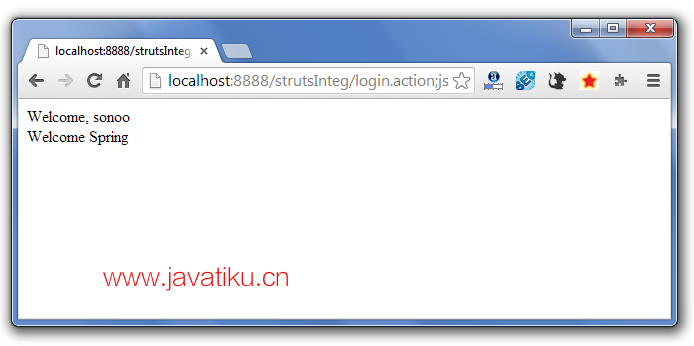
6) welcome.jsp
它打印 userName 和 message 属性的值。
<%@ taglib uri="/struts-tags" prefix="s"%>

Welcome, <s:property value="userName"/><br/>
${message}
7) error.jsp
这是错误页面。但是在此示例中不需要它,因为我们没有在 action 类的 execute 方法中定义任何逻辑。
Sorry! 输出: